




Screenshot des Bildschirms: Überwachung und Vertrauen
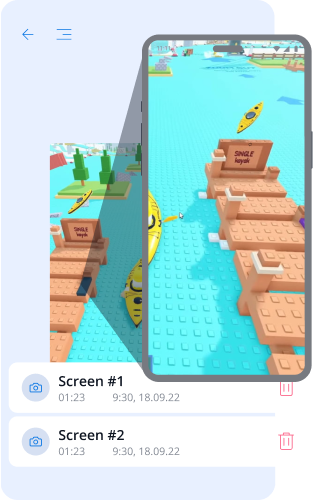
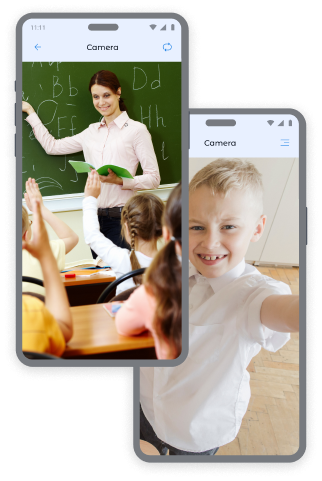
Fotos von den Kameras des Kindgeräts: Kontrolle und Sicherheit
Erhalten Sie sofortige Aufnahmen von der Frontkamera und Rückkamera des Geräts, um immer zu wissen, wo sich Ihr Kind aufhält und in welcher Umgebung es sich befindet.
Fotos von der Frontkamera:
- Bestimmung des Aufenthaltsortes und des emotionalen Zustands des Kindes.
- Überprüfung der Sicherheit des Kindes an öffentlichen Orten.
- Erhalten von Kontext in ungewöhnlichen Situationen.
Fotos von der Rückkamera:
- Überblick über die Umgebung des Kindes.
- Überprüfung der Sicherheit zu Hause, in der Schule oder mit Freunden.
- Erhalt visueller Informationen, wenn das Kind nicht auf Anrufe reagiert.
Möchten Sie mehr Bildschirmaufnahmen? Sie können zusätzliche Pakete auf der Preisseite erwerben, um sich noch sicherer bezüglich Ihres Kindes zu fühlen.
So machen Sie Bildschirmaufnahmen in der Kroha-App
Um einen Screenshot zu machen:
- Öffnen Sie den Abschnitt „Bildschirmaufnahmen“ in der Kroha-App.
- Wählen Sie den Aufnahmetyp: „Screenshot“, „Frontkamera“ oder „Rückkamera“.
- Drücken Sie die Schaltfläche „Einen Schnappschuss machen“.
- Sehen Sie sich die Fotos an im Abschnitt „Bildschirmaufnahmen“.
Dieses Kindersicherungstool hilft Ihnen, stets für die Sicherheit Ihrer Kinder zu sorgen.


FAQ zu Bildschirmaufnahmen
Wie hilft die Bildschirmaufnahme-Funktion Eltern?
Die Bildschirmaufnahme‑Funktion hilft Eltern dabei, besser nachzuvollziehen, was ihr Kind auf dem Gerät macht. Sie ermöglicht sowohl Screenshots des Bildschirms als auch Fotos mit der Front‑ oder Rückkamera, um Inhalte, die Umgebung und wichtige Situationen auf dem Gerät des Kindes zu überprüfen.
Welche Bildschirmaufnahmen können Eltern einsehen?
Mit der Kroha‑App können Eltern sowohl Screenshots des Bildschirms als auch Fotos von der Front‑ oder Rückkamera des Geräts ihres Kindes einsehen. Alle diese Aufnahmen sind im Bereich „Bildschirmaufnahmen“ verfügbar.
Wie bekomme ich Screenshots oder Fotos vom Handy meines Kindes?
Mit der Kroha‑App können Eltern sowohl Screenshots als auch Fotos mit der Front‑ oder Rückkamera des Geräts ihres Kindes erstellen. Öffnen Sie dazu den Bereich „Bildschirmaufnahmen“, wählen Sie die gewünschte Aufnahmeart aus und starten Sie die Aufnahme. Das erstellte Bild wird anschließend im Bereich „Bildschirmaufnahmen“ gespeichert und angezeigt.
Muss ich für zusätzliche Bildschirmaufnahmen extra bezahlen?
Die Bildschirmaufnahme‑Funktion ist im aktiven Kroha‑Abonnement enthalten. Wenn Eltern zusätzliche Bildschirmaufnahmen oder Fotos benötigen, können sie auf der Preisseite zusätzliche Bildschirmaufnahme‑Pakete hinzubuchen.
Funktioniert die Bildschirmaufnahme auf dem iPhone oder iPad meines Kindes?
Nein. Die Bildschirmaufnahme‑Funktion ist nur auf Android‑Geräten verfügbar. Auf dem iPhone oder iPad eines Kindes wird sie aufgrund von iOS‑Systembeschränkungen nicht unterstützt.
Lernen Sie die anderen Funktionen der App für die Kindersicherung kennen


Installiere die App





