


orbitals

写真と連絡先

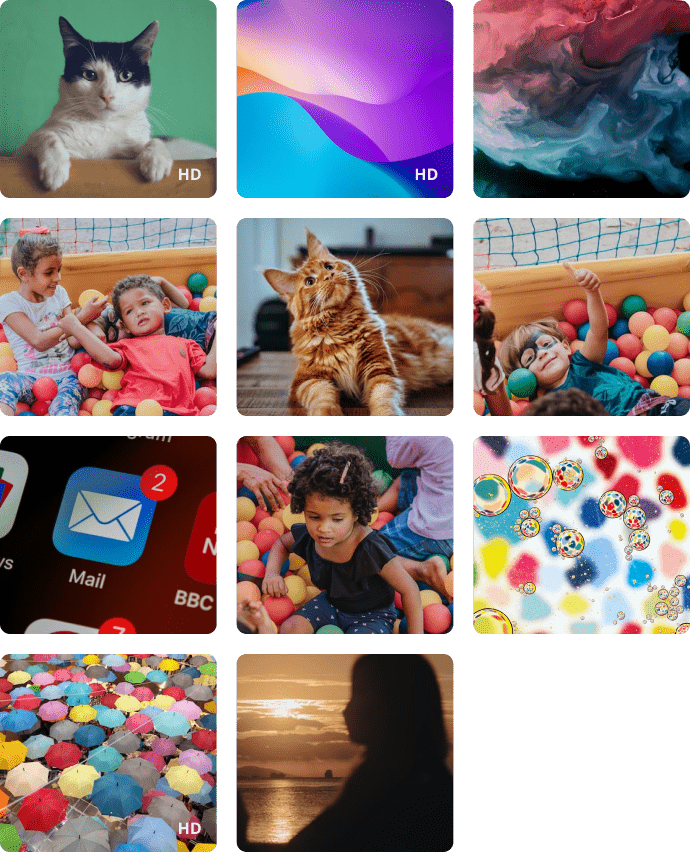
子供を守るためには、子供が誰とコミュニケーションをとり、何に興味を持っているかを理解する必要がある場合があります。 これを行うには、Kroha アプリで、両親が子供のデバイスから現在の写真を確認し、子供の携帯電話で連絡先帳を管理することができます。
App statistics

写真ビュー

写真ビュー機能を使用すると、両親はお子様が最近撮影した写真や受け取った写真をスマートフォンで確認することができます。 子供のギャラリーの最後の 100 枚の写真のみが表示されます。スペースを節約し、アプリを高速化するために、写真は圧縮形式で保存されます。HD 品質の写真が必要な場合は、写真をクリックし、HD 品質で写真をダウンロードする依頼をしてください。
picture
検索
icon
А
Alexandra
+1 (555) 555-1234
+1 (555) 555-1234
+1 (555) 555-1234
icon
Alina
+1 (555) 555-1234
icon
Alina
+1 (555) 555-1234
icon

連絡先リスト

連絡先リストは、親が子供のコミュニケーションを管理できる機能の 1 つです。両親は子供のスマートフォンに記録されたす全連絡先が確認できます。両親が遠隔から新しい連絡先を追加したり、不要な連絡先を削除したりできるのはとても便利です。

Contact Management & Photo Tracking - FAQs

How is the Photo Tracking feature useful for parents?

The Photo Tracking feature allows parents to view recent photos that the child has taken or received on their device. This can help parents better understand what content the child is exposed to or viewing or receiving.

Can parents see photos saved on the child’s phone?

Yes. Kroha allows parents to view recent photos saved in the child’s gallery. This may include photos taken by the child as well as images received on the device.

How many photos can parents view in the Kroha app?

Parents can view the last 100 photos from the child’s gallery in the Kroha app. The photos are stored in compressed form to save space and help the app work faster.

Why is Contact Management useful for parents?

Contact Management helps parents understand who is saved in the child’s phone contacts. It can be useful when parents want to check unfamiliar contacts or remove numbers that may not be appropriate or safe for the child.

Can I remotely add or delete a contact on my child’s phone?

Yes. In the Contacts section of the Kroha app, parents can add new contacts to the child’s phone or delete contacts that are no longer needed. Parents can also view all contacts saved on the child’s smartphone.

アプリをインストールする

子どもたちがオンラインで直面するリスクを軽減する
サイトからダウンロードする





